End-to-End Integration of Value-Added Services (VAS) via Safe Haven IBS API
The financial technology landscape is currently undergoing a seismic shift toward the "super-app" model, where platforms are no longer just repositories for digital currency but serve as a centralized hub for a user's entire financial life. Today’s consumers demand a frictionless experience where they can pay electricity bills, renew television subscriptions, and top up mobile data, all within the same interface. For developers, the challenge lies in building a system that is both robust enough to handle high transaction volumes and flexible enough to integrate various third-party providers.
The Safe Haven IBS API provides a professional-grade, unified infrastructure designed specifically to solve these complexities. This technical blog post will provide an exhaustive, step-by-step guide to integrating the four primary VAS categories, Airtime, Data, Cable TV subscription, and Electricity Subscription, from initial onboarding to post-transaction reconciliation. We will leave no stone unturned, detailing the discovery patterns and verification logic required for a production-ready deployment. For a deep dive into the underlying security infrastructure, please refer to our companion guide, Mastering Secure API Authentication: The Ultimate Guide to Safehaven OAuth 2.0 Client Assertion, which covers the specific authentication standards required.
Phase 1: Understanding the VAS Architectural Hierarchy
One of the most powerful features of the Safe Haven IBS API is its hierarchical organization. Instead of having a disjointed set of endpoints for every mobile network operator or power company, the API uses a unified three-tier structure: Services -> Categories -> Products.
1.1 Service Discovery
At the apex is the Service, representing the broad utility types.
- GET /vas/services: This is the entry point for your application's UI. It returns the list of all value-added services available—typically Airtime, Data, Cable TV, and Power.
- GET /vas/service/: If you need to refresh data for a specific service ID, this endpoint returns the object for that specific service.
1.2 Category Selection
Within each service are Categories, which usually correspond to specific providers. For example, under the "Airtime" service, categories might include MTN, Airtel, or Glo.
- GET /vas/service/{id}/service-categories: This call fetches the providers relevant to the selected service. This is how you populate the "Select Network" or "Select Disco" dropdown in your UI.
1.3 Product and Offer Lists
Products are the specific items a user can purchase.
- GET /vas/service-category/{id}/products: This endpoint is indispensable for Data and Cable TV. For Data, it returns the specific bundles (e.g., 2GB Monthly); for Cable TV, it returns the available bouquets (e.g., DSTV Premium).
Phase 2: The End-to-End Integration Workflow
The technical integration follows a consistent five-step workflow across all services. By standardizing this flow, you can create a modular codebase that is easy to maintain.
Step 1: Initialize Global Services
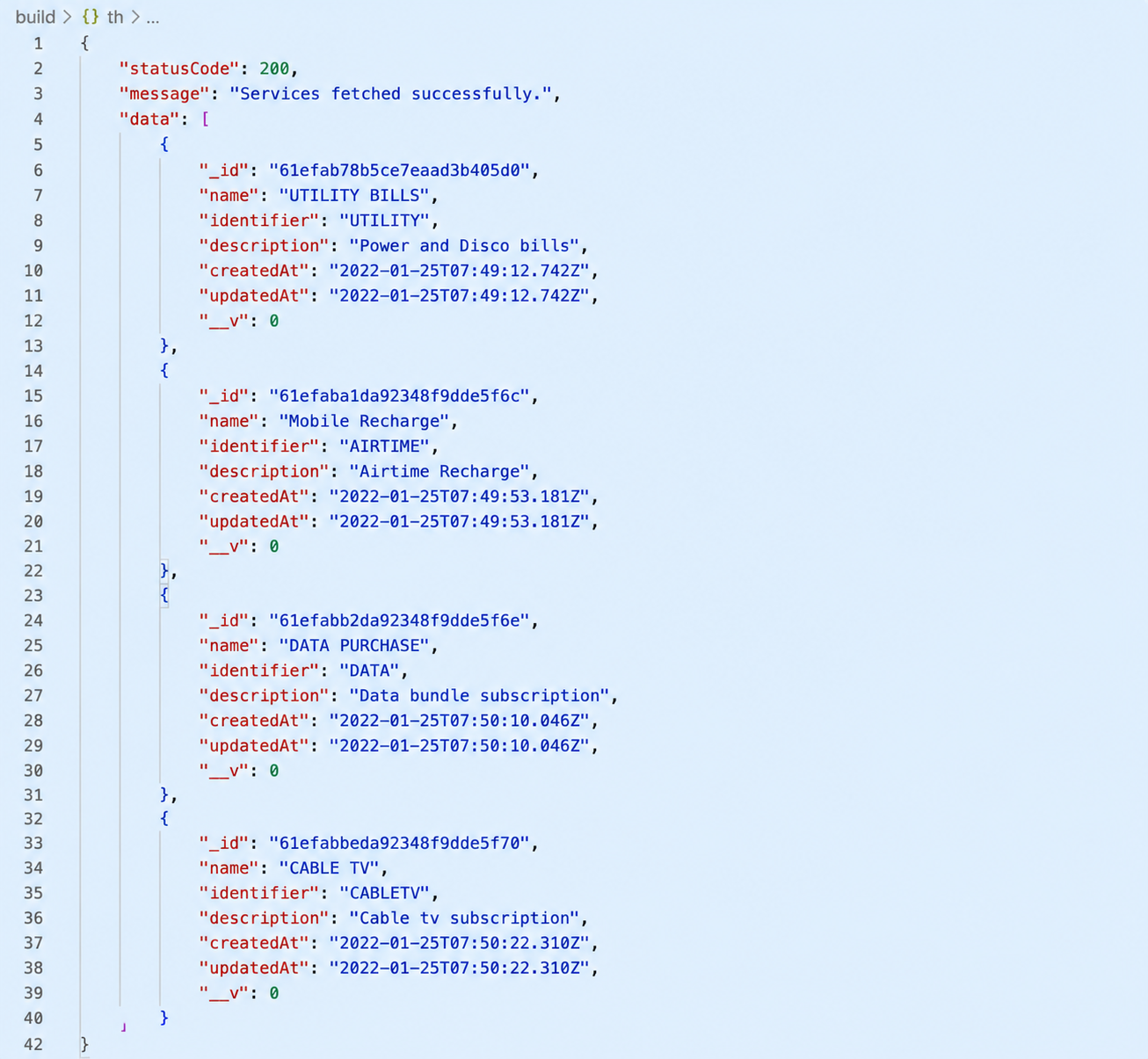
Your application should query the global service list to build its main dashboard.
- Implementation: Call GET /vas/services.
- UI/UX Tip: Cache these results locally for a few hours to improve load times, as the broad list of services rarely changes daily.
- Sample response
Step 2: Dynamic Category and Product Loading
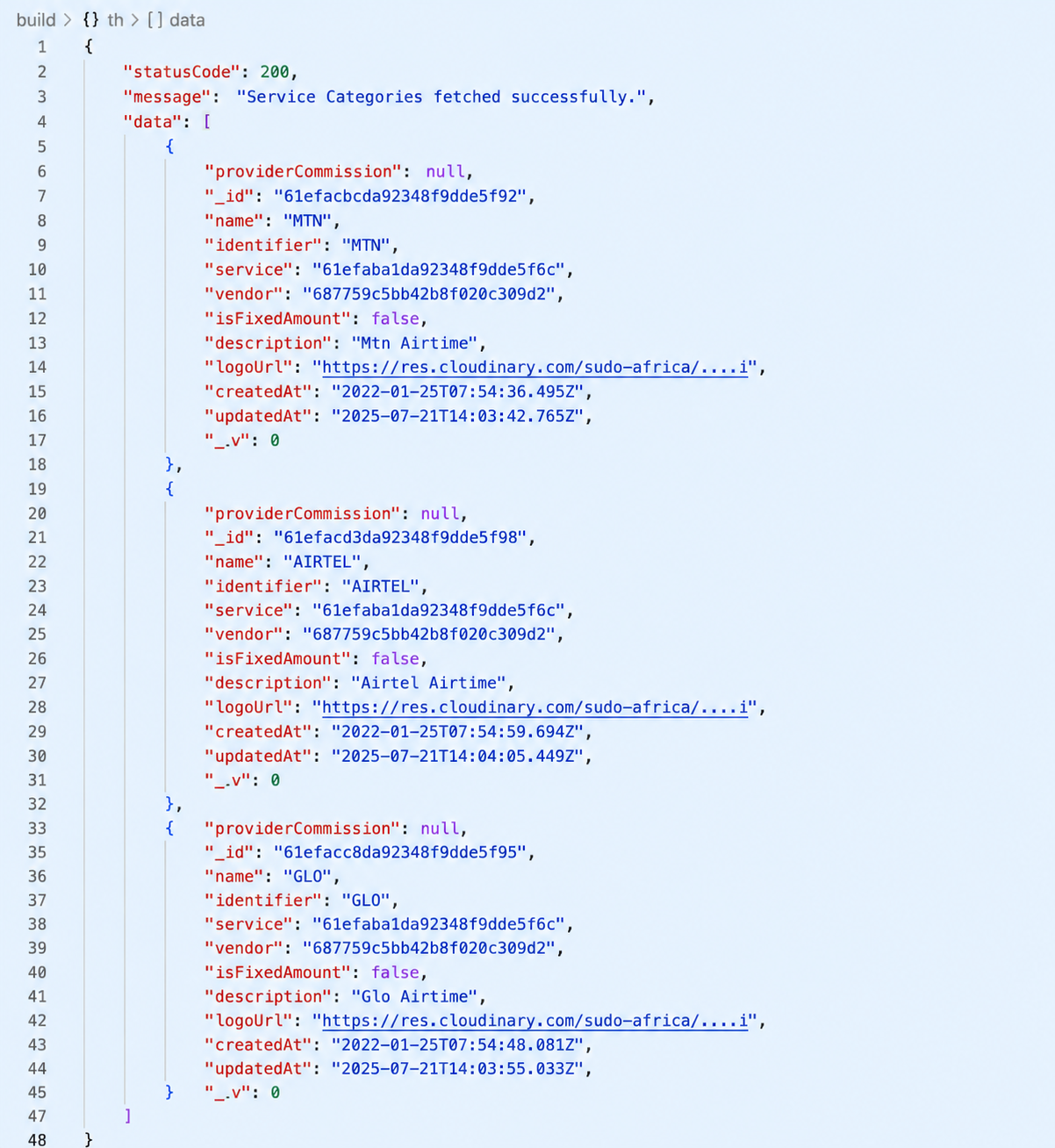
When a user clicks on a service (e.g., "Data"), the app must fetch the providers and plans.
- Implementation:
- Call GET /vas/service-categories using the Service ID.
- UI/UX Tip: Cache these results locally for a few hours to improve load times, as the broad list of services rarely changes daily.
Sample response :
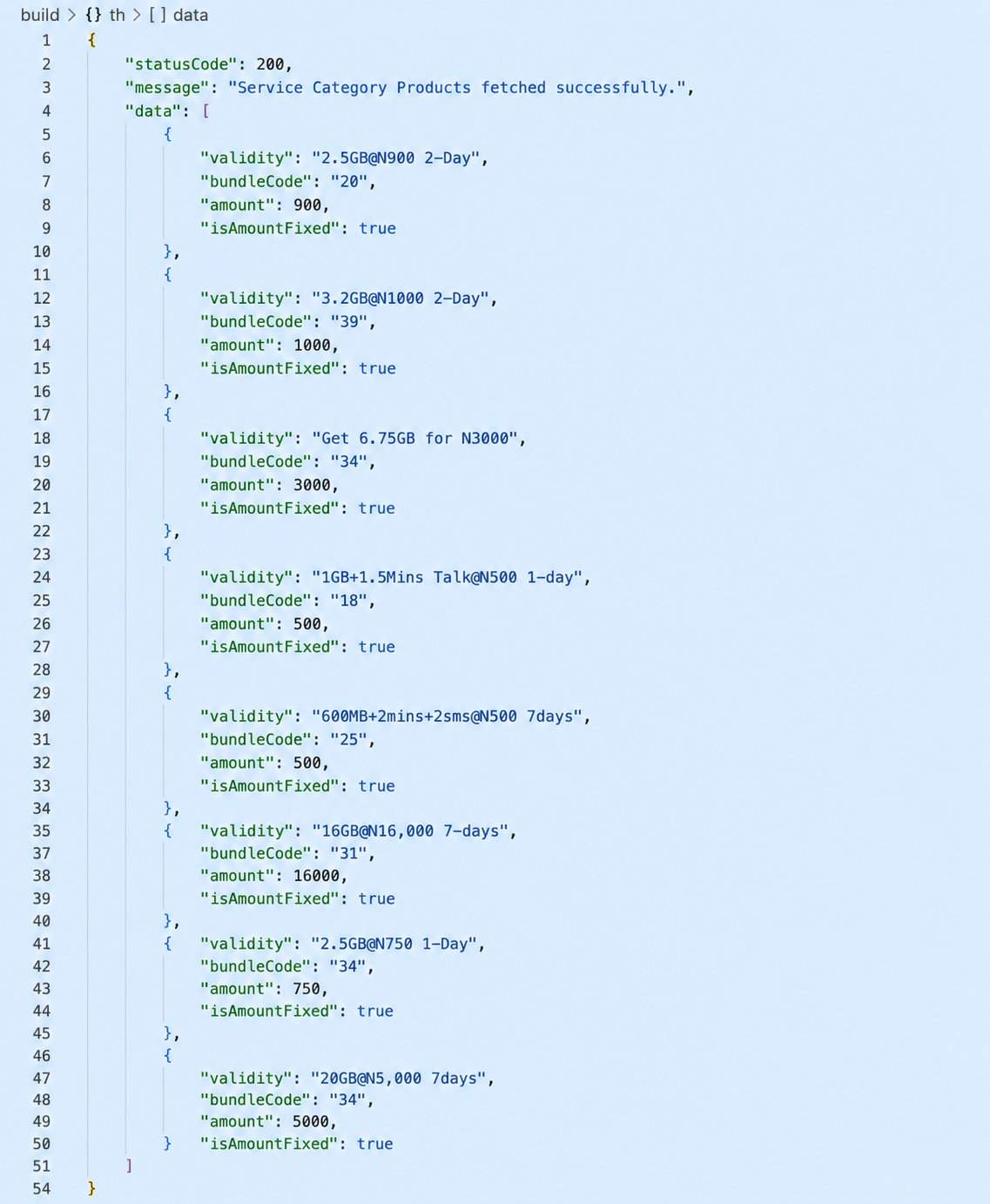
- For Airtime, Step 2 often ends at the Category level since users typically input a custom amount. For Data and Cable TV, this step is mandatory to get the specific Product ID needed for payment. Once a provider (Category) is chosen, call GET /vas/service-category/{id}/products.
Sample response :
Step 3: Mandatory Verification (Power & Cable TV)
This is the most critical safety feature of the API. Because meter numbers and smartcard IDs are prone to user error, they must be validated before funds are deducted.
- Implementation: Call POST /vas/verify.
- Input: The unique identifier (Meter Number or IUC/Smartcard ID).
- Outcome: The API returns the customer's registered name.
- Professional Requirement: Your UI must display this name to the user and ask them to confirm it is correct before they can proceed to payment.
Step 4: Transaction Execution
Once confirmed, you trigger the specific payment endpoint:
- Airtime: POST /vas/pay/airtime.
- Data: POST /vas/pay/data.
- Cable TV: POST /vas/pay/cable-tv.
- Power: POST /vas/pay/utility.
Step 5: Post-Transaction Status and Logging
Immediately after a payment request, the transaction might be "pending." You must confirm the final state.
- Verification: Use GET /vas/transaction/ with the specific ID to view the status of that individual request.
- History: Use GET /vas/transactions to populate the user's "Transaction History" or "Receipts" page.
Phase 3: Category Deep Dives, The Technical Nuances
While the general flow is the same, each category has specific requirements that must be handled correctly in your code
3.1 Airtime: The Simple Direct Payment
Airtime is unique because this is a direct purchase to a phone number.
- The Difference: The user provides a custom amount.
- Critical Detail: Since there is no "Verify Phone" endpoint, it is highly recommended to implement a "Confirm Phone Number" field in your UI to prevent users from sending airtime to the wrong person.
3.2 Data Bundles: Product-ID Driven
Data transactions are strictly "Product-ID" driven.
- The Difference: You cannot send a generic amount like "500 Naira." You must send the exact ID for a "1.5GB 30-Day Plan".
- Logic: Your payment call must include the product_id fetched from the Products endpoint.
3.3 Cable TV: The Verification Loop
Cable TV subscriptions combine the complexity of product selection with the necessity of verification.
- The Workflow:
- Select provider (Category).
- Verify the Smartcard/IUC (POST /vas/verify).
- Fetch and select the Bouquet (Product).
- Pay (POST /vas/pay/cable-tv).
3.4 Power (Utilities): Prepaid vs. Postpaid
Power integration requires handling two different meter types.
- The Workflow:
- Select the Disco (e.g., EEDC).
- Verify the Meter (POST /vas/verify). The response will confirm if the meter is Prepaid or Postpaid.
- Enter Amount and Pay (POST /vas/pay/utility).
- The "Token" Outcome: For prepaid meters, the final transaction details from GET /vas/transaction/ will often contain a token. Your UI must clearly display this token to the user so they can manually enter it into their meter.
Phase 4: The "Faster and Simpler" Way to Integrate
Integrating four separate services can lead to code bloat. For developers looking for a faster, more elegant solution, we recommend a Unified Abstraction Model. This approach treats the entire VAS module as a single generic pipeline.
The "Universal VAS Engine" Architecture
Instead of building specific logic for "Airtime" and specific logic for "Power," create a single VAS Controller that uses the following patterns:
- Generic Discovery Wrapper: Build one function that accepts a service_id and a category_id. This function handles fetching everything from categories down to products. Your UI then just needs to render whatever the "Product List" returns, regardless of whether it's a data bundle or a TV bouquet.
- Shared Authentication Header: Centralize your OAuth2 logic. Use an axios interceptor (or equivalent) to attach the access token to every request automatically. This eliminates the need to handle authentication headers in your individual payment functions.
- The "Strategy Pattern" for Payments: Create a single executePayment function that takes a type parameter (airtime, data, utility, or cable-tv). Use a simple switch statement to route the request to the correct endpoint (/pay/airtime, /pay/utility, etc.). This allows you to use a single "Confirmation Screen" UI for all four services.
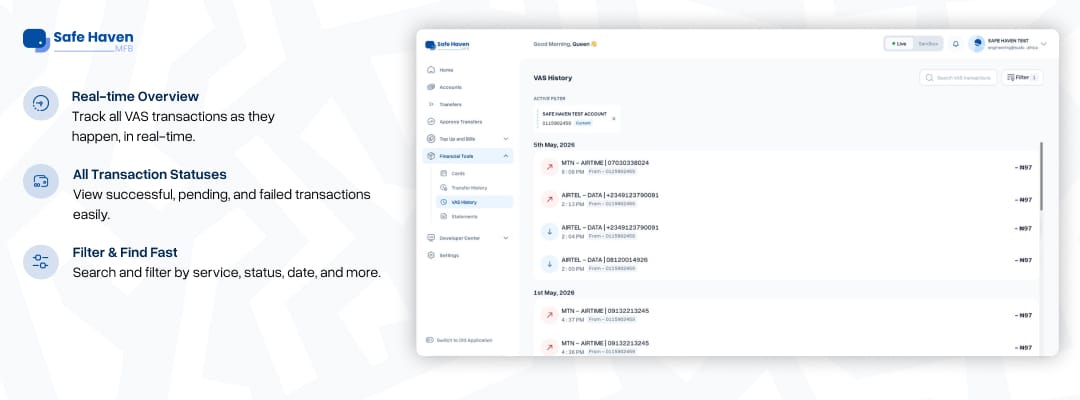
- Single-Endpoint Reconciliation: Use the GET /vas/transactions endpoint as your "Single Source of Truth". Instead of maintaining separate local databases for "Airtime History" and "Utility History," pull everything from this one endpoint and use the returned metadata to display the correct icon (e.g., a lightbulb for power).
- Standardized "Try It!" Prototyping: Before writing a single line of backend code, use the "Try It!" feature in the documentation. This allows you to generate the exact JSON response for your specific language, which you can use to automatically generate your data models/interfaces.
Ready to start building with VAS? Visit https://bit.ly/4uaX4CJ and begin integrating Airtime, Data, Cable TV, and Electricity payment services into your application. Once authenticated, you can start exploring service discovery, product retrieval, customer verification, and real-time transaction processing through the VAS API.