Building and Managing NGN Cards with Sudo Africa
For years, launching a card product in Africa meant courting a bank, negotiating a scheme membership, and waiting months before you could issue a single card. That barrier is what kept card issuing out of reach for most fintech teams. Programmable card infrastructure has changed the equation: you can now embed issuing directly into your product through an API and skip the parts that used to take quarters.
Sudo Africa is one of the platforms making that possible. It gives you a card-issuing and payments layer that lets you create, fund, and manage both virtual and physical cards without a direct bank partnership or a scheme integration of your own. You bring the product idea; Sudo handles the regulated plumbing underneath.
This guide walks through issuing and managing NGN cards on Sudo in the order you would actually build them. By the end, you will be able to:
- Set up your environment and authenticate against the API
- Choose the right funding source for how your product moves money
- Create a cardholder and issue an NGN card (virtual or physical)
- Apply spending controls and manage a card through its lifecycle
- Display sensitive card details to your users without taking on the PCI scope yourself
Whether you are building a neobank, an expense-management tool, or an embedded-finance feature inside an existing app, the same flow applies.

What Sudo Handles for You
Before touching an endpoint, it helps to know where the line sits between what you build and what Sudo takes care of. In practice, Sudo owns four things so you don't have to:
- Card issuing. Creating both virtual and physical cards on local schemes such as Verve and AfriGo.
- Funding and settlement. A funding layer that is decoupled from issuing, so you decide where a card's money actually comes from.
- Spending controls and authorization. Real-time rules that decide where, how, and how much a card can be used.
- Compliance and KYC. The regulatory and card-scheme complexity that would otherwise require a banking licence or a scheme membership.
You can create cards two ways: no-code, through the Sudo dashboard, or low-code, through the API shown here. This guide focuses on the API path, because that is what you will ship inside your own product. (If you only need a handful of cards, the dashboard route is covered separately in Sudo's no-code guide.)

First, Understand Funding Sources
This is the step most integrations get wrong by skipping it. A card is useless until it has somewhere to pull money from, and on Sudo that “somewhere” is a funding source. Deciding this up front shapes how every transaction on your cards is settled, so it belongs before card creation, not after.
A funding source represents the bank account that funds are drawn from when a card is used. Sudo offers three types, and the right choice depends on who you want to carry the balance:
- Default funding source. Funds are taken from the customer's own wallet at the moment of authorization. This is the default if you don't specify anything, and it fits products where each user holds their own balance.
- Account funding source. Funds are taken from your business's settlement account instead of the customer's wallet. Useful when you want central control over spending, for example, a company issuing cards to staff.
- Gateway funding source. Like the account source, your settlement account is charged, but you get to approve or decline each transaction in real time via a webhook. This is the choice when you run your own ledger and want the final say on every authorization.
Two things to keep straight. First, a funding source is not the same as the debitAccountId you pass during card creation or funding; that field points to the settlement account charged only for that one create-or-fund action. Second, virtual cards require a debitAccountId, so make sure you have that account ready before you issue one. Every card you create also gets its own wallet, regardless of the funding source you pick.
Setting Up: Account, Environment, and Cardholder
Register and get sandbox access. Create a free account at app.sudo.africa. You get immediate access to a sandbox that mirrors production, so you can build and test the entire flow with test funds before anything goes live. Authenticate every request with your API key as a bearer token.
A card always belongs to a cardholder, an individual or business you have registered. Create the cardholder first; the ID it returns is what ties a card to a real, KYC'd identity.
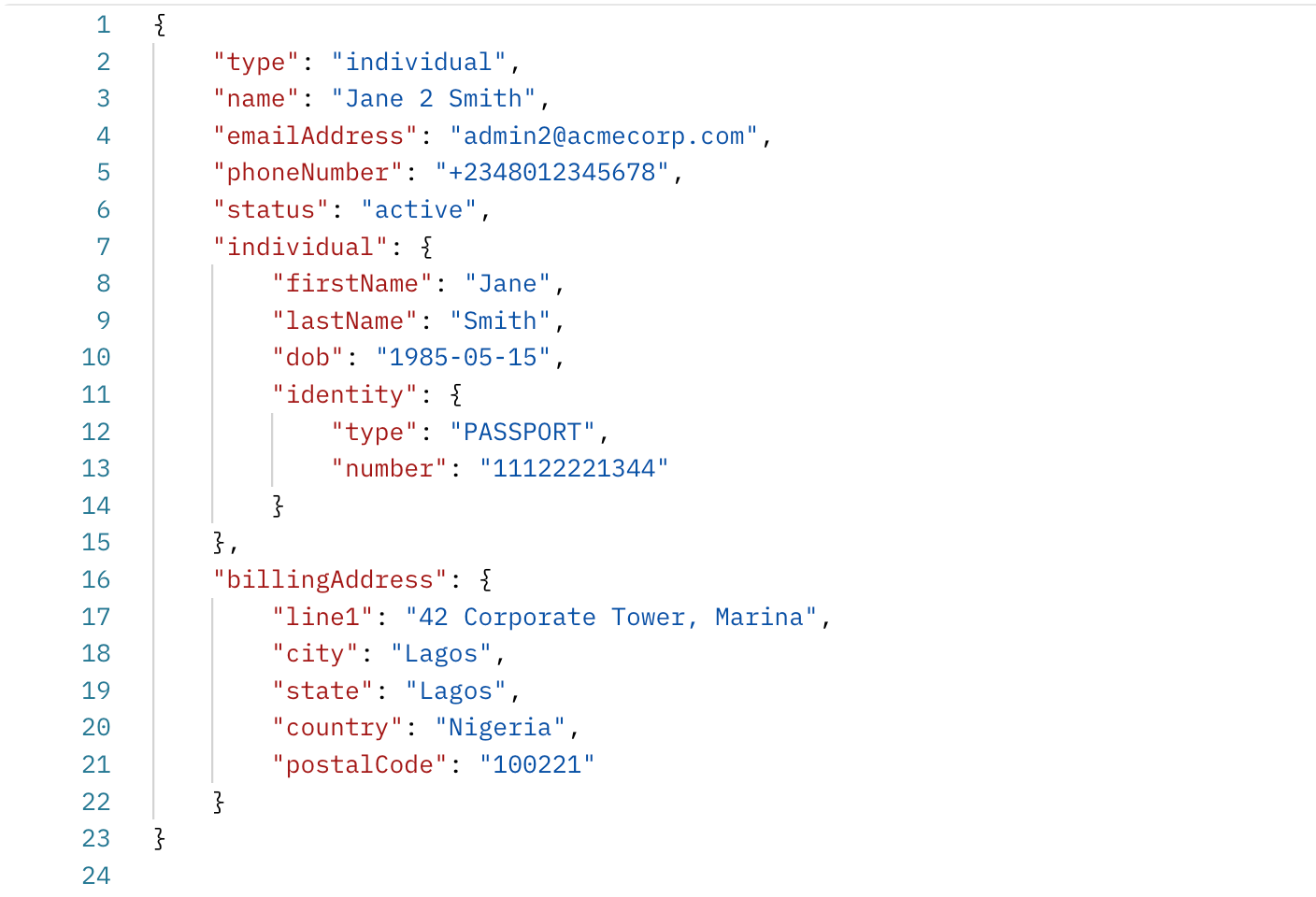
The response returns a customer _id. Hold on to it; you will pass it as customerId when you issue the card.
Issuing an NGN Card
With a funding source decided and a cardholder created, issuing the card itself is a single POST request. Before the payload, it's worth being clear on what you're choosing, because two decisions here shape the whole card.
Virtual or physical?
- Virtual cards are digital-only and issued instantly. They're ideal for online payments, subscriptions, and per-user or single-purpose cards where you want to avoid the cost and delay of shipping plastic. Remember: a virtual card needs a debitAccountId.
- Physical cards are for in-person use at POS terminals and ATMs. They carry a manufacturing and delivery step and a PAN printed on the card, so you'd choose them when your users need to tap or withdraw cash.
Issue the card
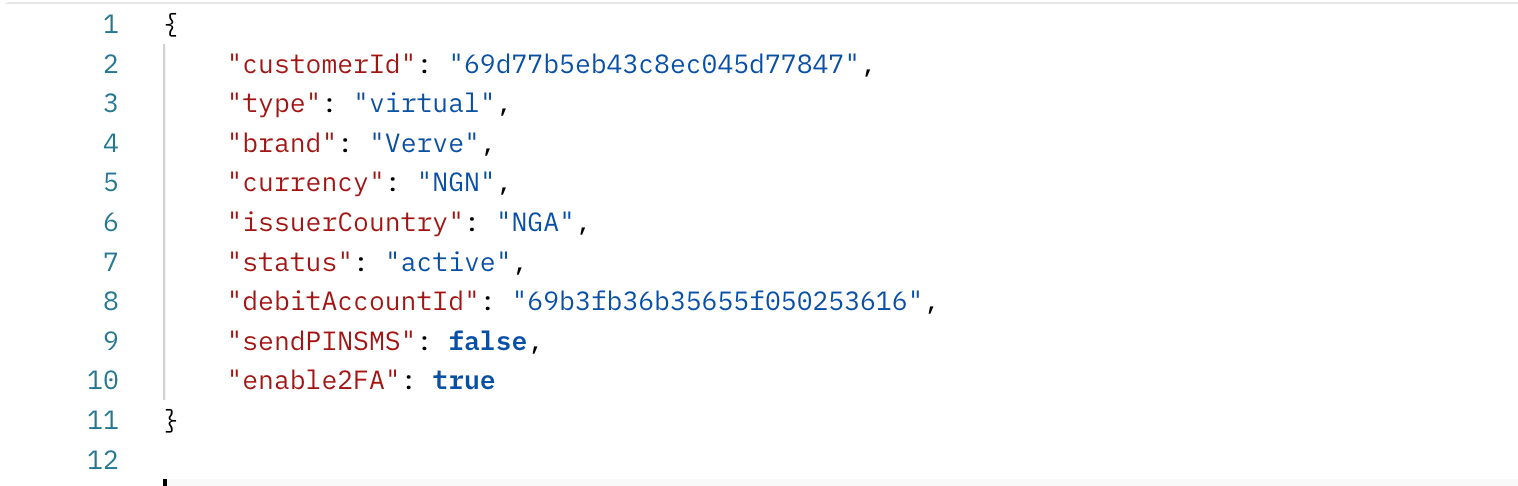
A successful call returns a card object with the card ID and a masked PAN, which you then manage for the rest of its life. Build in error handling from the start: the API returns clear error objects with status codes, such as 400 for a bad payload or 402 for insufficient funds, so you can give users a useful message or trigger a retry instead of a silent failure.

The parameters that matter, and why
- Type : virtual or physical, as above. This is the one choice you can't change after issuance.
- Currency + issuerCountry: set to NGN and NGA for a domestic Nigerian card. Together, these route the card correctly over local rails like Verve or AfriGo.
- Brand : the scheme the card runs on (for NGN, typically Verve or AfriGo).
- Enable2FA : turn this on to require an OTP for web and mobile transactions. It's a small flag that meaningfully cuts online fraud, so default it to true unless you have a reason not to.
- DebitAccountId : the settlement account charged at creation/funding; required for virtual cards.
- SpendingControls : channel and limit rules, covered next.
Funding and Spending Controls
You've chosen where money comes from (the funding source); spending controls decide how it's allowed to leave. These rules are enforced by Sudo at authorization time, which means a blocked transaction is declined before it ever settles, not refunded afterwards. That's what makes them useful for fraud prevention and for keeping enterprise spending inside budget.
You can gate cards by channel (ATM, POS, web, or mobile), allow or block merchant categories, and set spending limits per interval. Here's a typical control block capping a card at NGN 100,000 per month across all channels:
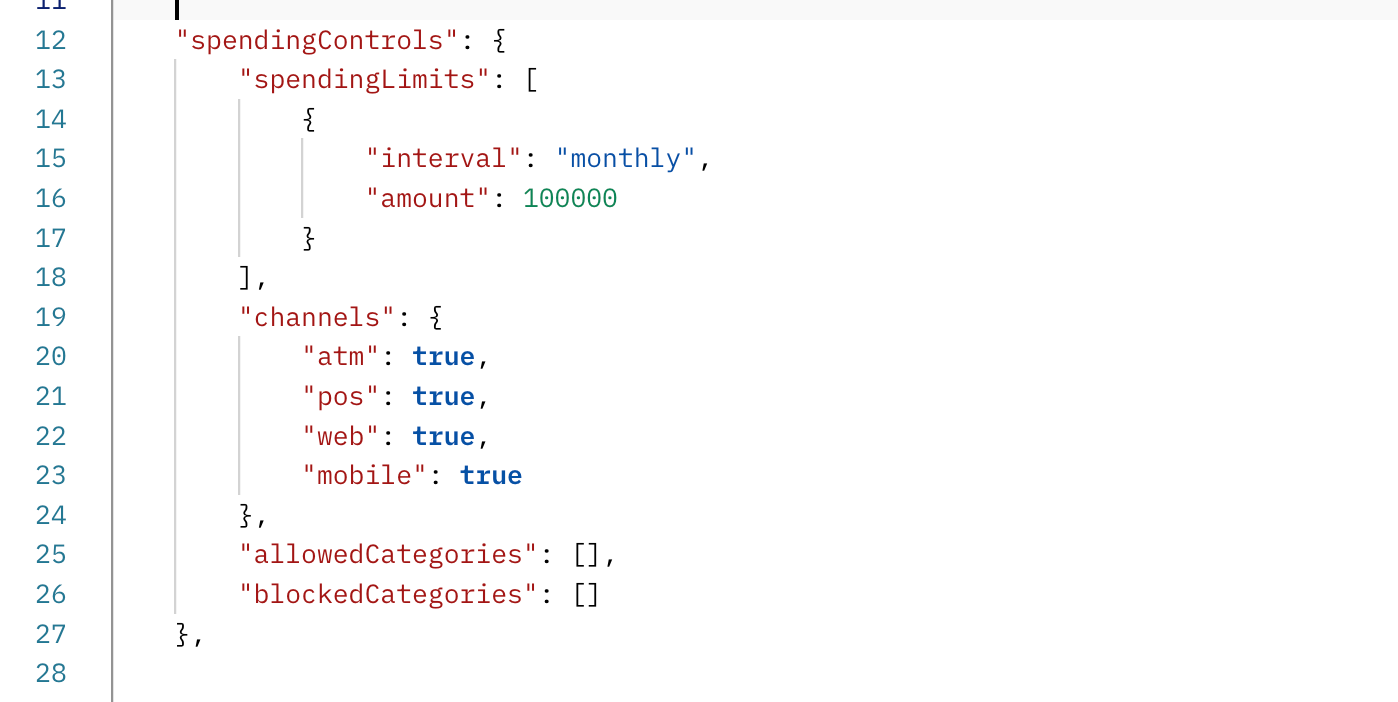
Because these controls live on the card object, you can tighten or loosen them later without reissuing, which is what makes them practical for real products rather than a one-time setting.
Showing Card Details Without Taking On PCI Scope
By default, Sudo redacts the sensitive fields, full PAN, CVV2, and PIN, in every card response. That's deliberate: the moment those values pass through your servers, you inherit the full weight of PCI-DSS compliance. So how do you show a user their own card number?
Sudo routes it through a service called Secure Proxy, so the data goes straight from Sudo's compliant servers to your user's browser and never touches your backend. The flow is
- Generate a card token for the specific card you want to reveal.
- Load the Secure Proxy Show library in your front end. It injects a secure iframe that Sudo hosts.
- Request each field (number, CVV2, and PIN) into that iframe using the card token in the authorization header.
The sensitive values are rendered inside the isolated iframe, visible to your user but never readable by your own code. You get a native-looking “show card details” experience while the PCI burden stays with Sudo and Secure Proxy, not you. (This replaces the idea of a plain “reveal” endpoint; there isn't one that hands raw card data back to your server, by design.)
Managing Cards After Issuance
Issuing the card is the beginning, not the end. Most of the work in a real product is what happens over the months a card is live, and Sudo exposes that as a handful of operations you'll reach for constantly:
- Freeze and unfreeze. Flip a card's status between active and inactive, providing the fastest response when a user reports their card missing.
- Replace. Issue a new card as a direct replacement for a lost or stolen one, carrying over the cardholder while retiring the old card ID.
- Tag with metadata. Attach your own business context to a card, such as a user tier or a department, so your systems can reason about it later.
- Monitor. Track transactions and authorizations in real time through the API and webhooks, and reconcile against your own ledger.
None of these require a support ticket or a bank's involvement, which is the whole point: the card stays fully programmable after it's in your user's hands.

Security and Compliance, Briefly
The reassuring part is how little of this you have to build. Three things carry most of the weight:
- PCI compliance by default. Sensitive data is redacted in responses and only ever displayed through a secure proxy, keeping it off your systems.
- Two-factor authentication. Setting enable2FA to true adds OTP validation on online transactions to cut fraud.
- Tokenization. Card numbers are tokenized rather than passed around in the clear.
Because Sudo abstracts the scheme and regulatory layers, you get to build a secure card experience without a banking partnership or a compliance team of your own.
Where This Leaves You
Step back, and the shape of it is simple. Pick a funding source, register a cardholder, issue a card, set its controls, and manage it over time, all through a handful of endpoints that used to represent months of banking negotiations.
But the real shift isn't that issuing a card got easier. It's what that unlocks: you're no longer just handing out payment instruments; you're building financial experiences around them, cards that fit your product, your rules, and your users. That's the part worth integrating.